
Free
$0
Free for one firewall.
- One firewall, full live dashboard
- Interfaces with live rates
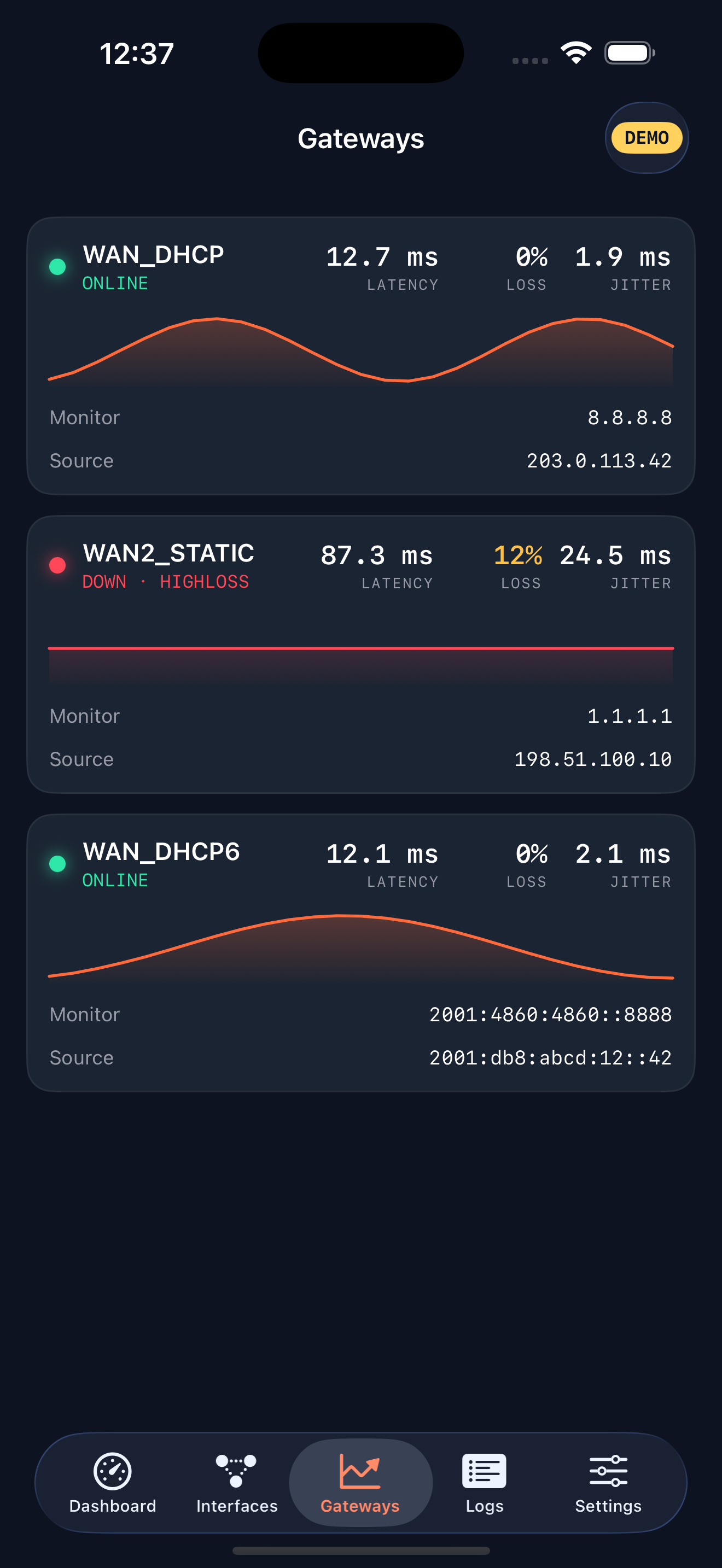
- Gateways with sparklines
- Services & DHCP leases
- Demo mode with sample data
- Multiple firewalls
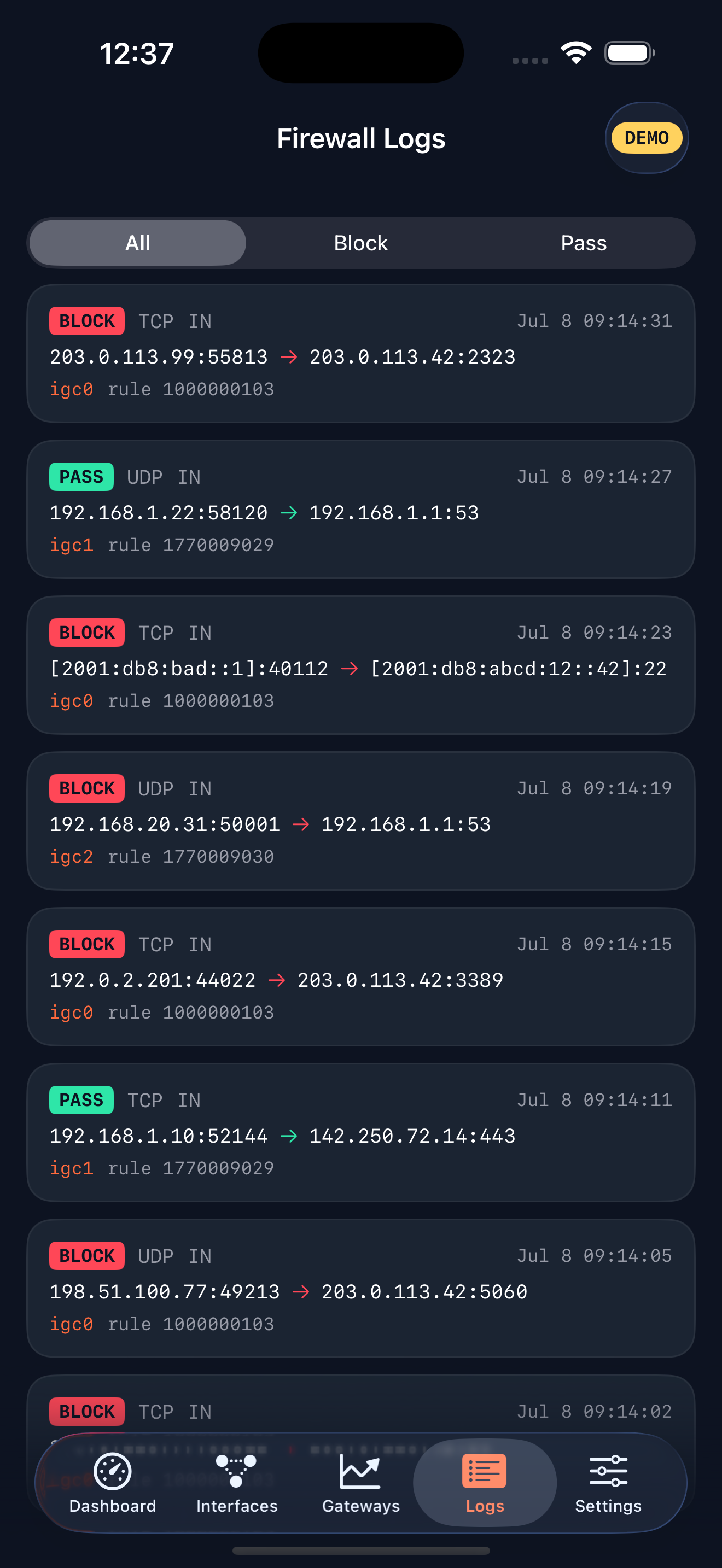
- Firewall-log viewer & widgets
- Alerts

Forgehaven Labs · FireGlance · iOS · for pfSense® firewall admins
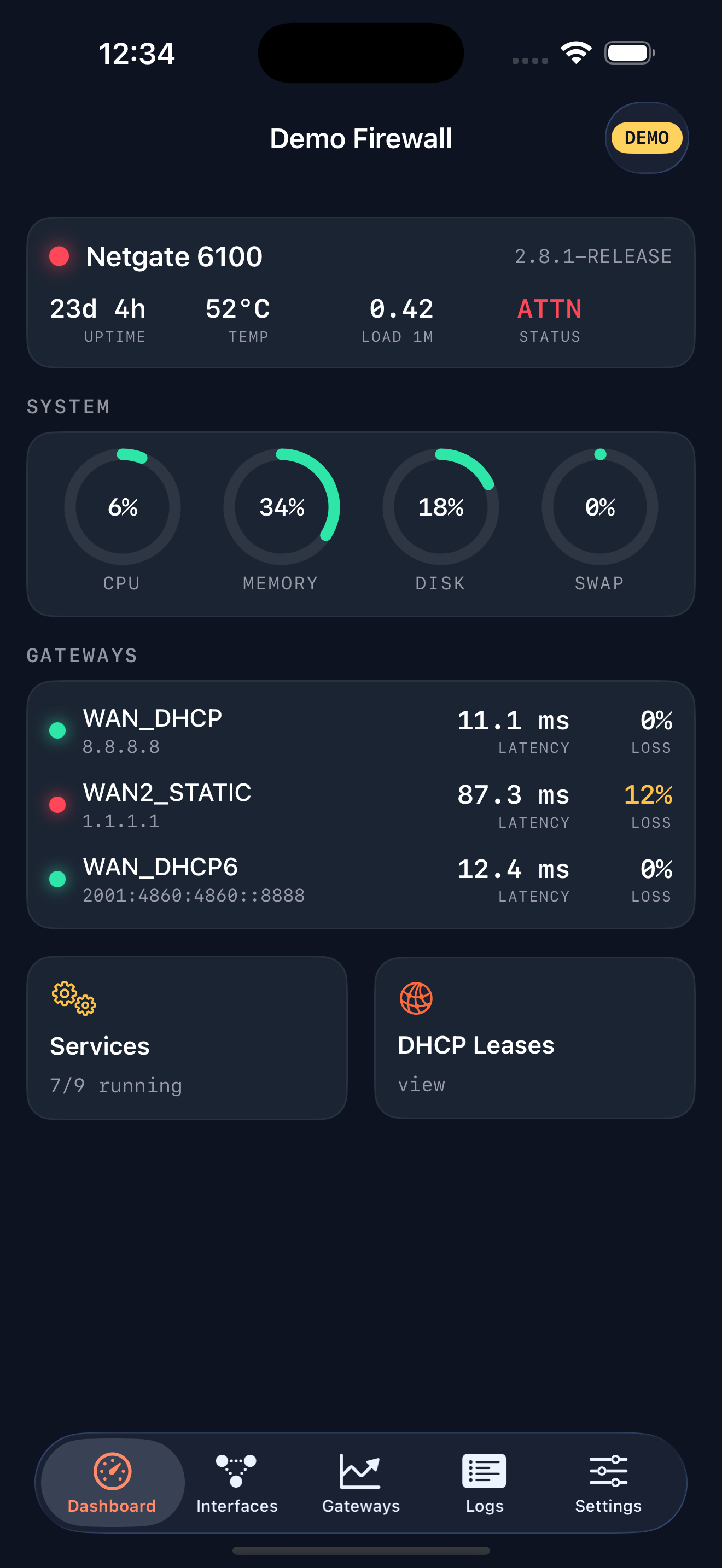
FireGlance is an independent iPhone dashboard for pfSense® firewalls. System gauges, gateway latency and loss, live interface rates, services, and DHCP leases, refreshed every few seconds, via the free open-source pfREST API package you install on the firewall first.
Coming soon to the App Store · iOS 17+ · one-time unlock, no subscription
The at-a-glance layer
The 6 a.m. question every admin answers by logging into the webConfigurator and digging through four pages. FireGlance answers it in one glance from your pocket: status, gateways, interfaces, and services on one live screen. Read-only in v1, so it can never change a rule.
What it does
Status LED, CPU, memory, disk, and swap ring gauges, plus uptime, load, and temperature, polled every few seconds with last-good values kept on blips.
Latency and packet loss per gateway with five-minute sparklines. A flapping WAN shows up as a shape, not a number you have to stare at.
Up/down state, IPv4 and IPv6 addresses, and live in/out throughput computed from counter deltas, not whatever the last page load said.
The raw filterlog stream decoded into readable pass/block entries: source, destination, ports, interface, and the rule's tracker ID.
When iOS doesn't already trust the certificate, FireGlance shows its SHA-256 fingerprint and you approve it once per firewall. The pin then holds, and any later change is refused with a warning, never silently trusted.
the security modelNo account, no backend, no analytics. Your phone talks directly to your firewall; API keys live in the iOS Keychain.
On your phone
The honest fine print
pfSense CE has no official REST API, so FireGlance talks to the free, open-source pfSense REST API package ("pfREST", pfrest.org), which you install on the firewall before connecting: run the pkg-static add command for your pfSense version from the pfrest.org install guide. It is not in System > Package Manager, and you reinstall it after every pfSense upgrade. FireGlance is read-only in v1: it never changes rules, never restarts services, never writes anything. It's built for LAN and VPN use; please don't expose your firewall's API to the open internet.
Who it's for
A pfSense box guards the rack. FireGlance is the "is it healthy" glance you've been faking by logging into the web UI from your phone browser.
"The internet is down" arrives by text. One glance tells you whether it's the WAN, a gateway, or nothing at all before you leave the couch.
A box at home, a box at the parents', one at the office. Pro watches every firewall you run, over the VPN you already have.
Most apps refuse self-signed HTTPS or trust it blindly. FireGlance pins the fingerprint you approve, and treats a change as a warning.
Pricing
No subscription. No ads. The core dashboard isn't a teaser: it's the full experience, free for one firewall.
$0
Free for one firewall.
$9.99
One-time. Lifetime.
One-time purchase · no subscription
FAQ
Almost. You install one free package first: the open-source pfSense REST API package ("pfREST") from pfrest.org. pfSense CE ships no API of its own, so every client needs something like it. From the firewall's shell (SSH or Diagnostics > Command Prompt), run the pkg-static add command for your pfSense version listed at pfrest.org; it is not in System > Package Manager. pfSense removes unofficial packages when it updates, so reinstall pfREST after every pfSense upgrade.
No. v1 is strictly read-only by design. It sends only read requests. It cannot edit rules, restart services, or write configuration.
Please don't. FireGlance is built for LAN and VPN use: it talks to the firewall's address on your own network, the same way you reach the webConfigurator.
Fully supported, with certificate pinning. If iOS doesn't already trust the certificate, FireGlance shows you its SHA-256 fingerprint and you approve it once. After that the pin is enforced, and any change is refused with a warning rather than silently trusted.
No, and it never will be. Free covers one firewall with the full dashboard. Pro is a single $9.99 purchase that unlocks multiple firewalls, the log viewer, widgets, and alerts.
No. FireGlance is an independent project, not affiliated with, endorsed by, or supported by Netgate. pfSense is a registered trademark of Rubicon Communications, LLC.
Coming soon
FireGlance is heading to the App Store. Drop a line and I'll tell you the day it lands.
iOS 17+ · one-time purchase · no subscription
FireGlance is an independent project and is not affiliated with, endorsed by, or supported by Netgate. "pfSense" is a registered trademark of Rubicon Communications, LLC (Netgate), used here only to describe compatibility. The pfSense REST API package ("pfREST") is an independent open-source project by its own authors. Using FireGlance requires installing that free package on your firewall.